Upgrade your home security with a smart digital door lock that blends convenience, reliability, and modern design. This guide highlights five top options, covering Bluetooth, Wi‑Fi, keypad, and fingerprint access. Each lock supports keyless entry, remote control, and multiple unlocking methods to fit diverse preferences. Compare features, installation, and compatibility to choose the right model for your front door.
| Product | Brand | Unlocking Methods | Connectivity | Notes |
|---|---|---|---|---|
| Philips Smart Lock with Handles | Philips | Fingerprint, PIN, Keys, App | Bluetooth | Two handles; remote via gateway (sold separately) |
| Yamiry Smart Door Handle Lock with Keypad | Yamiry | Fingerprint, Passcodes, App, Fobs, Key | Bluetooth | Reversible handle; quick install |
| Philips Wi‑Fi Door Lock | Philips | App, Passcode, Fingerprint, Key, Voice | Built‑in Wi‑Fi | Remote control from anywhere |
| Sifely Keyless Entry Fingerprint Lock | Sifely | Fingerprint, Passcode, Fob, Card, App, Key | Bluetooth | Weather resistant; 6‑in‑1 access |
| eufy Security Smart Lock C220 | eufy Security | Fingerprint, Passcode, App, Key, Voice | Built‑in Wi‑Fi | Self‑learning AI; 8 months battery |
Philips Smart Lock With Handles
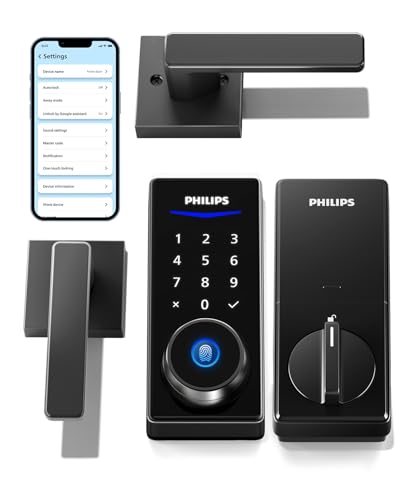
The Philips Smart Lock with Handles provides a comprehensive, keyless entry experience. It includes two lever handles and a Philips smart lock to upgrade an existing door setup. The lock supports four unlocking methods: fingerprints, PIN codes, physical keys, and a mobile app, offering flexible access for family members and guests. A built‑in Bluetooth connection enables smartphone control within about 8–10 meters, while a separate Wi‑Fi gateway (sold separately) broadens access to remote operations, permission sharing, and unlock history. Batteries should be replaced promptly after a low‑battery alert to maintain performance.
Yamiry Smart Door Handle Lock With Keypad

Yamiry’s Smart Door Handle Lock combines six unlocking methods: fingerprint, Bluetooth app control, personalized passcodes, key fobs, mechanical keys, and optional Alexa voice unlock (requires a separate Wi‑Fi gateway). Quick installation fits most standard American wooden doors in about 10 minutes, with a reversible handle compatible with both left and right‑hand doors. The app provides access management features like temporary codes and activity logs, helping homeowners and guests stay securely connected, even when away from home.
Philips Wi‑Fi Door Lock

Philips Wi‑Fi Door Lock offers flexible unlocking options including app control, passcodes, fingerprints, and physical keys, plus voice integration with Alexa or Google Assistant. Built‑in Wi‑Fi enables remote locking and unlocking from anywhere without an extra hub. Note that compatibility requires a 2.4 GHz network, and a stable remote connection is best maintained within about 65 feet of the router. This model emphasizes remote convenience for busy households and frequent travelers.
Sifely Keyless Entry Fingerprint Lock

Sifely’s Keyless Entry Fingerprint Lock is designed for homeowners and rental hosts, offering six access methods: fingerprint, passcode, fob, card, app, and key. The lock is BHMA/ANSI certified and IP65 weather‑resistant, making it suitable for indoor and outdoor use. Installation is screwdriver‑driven and quick, fitting left‑ or right‑hand doors. The battery backup and alert system ensure continued operation, with options to share codes remotely for easier guest access management.
eufy Security Smart Lock C220

eufy Security Smart Lock C220 features built‑in Wi‑Fi for direct remote control, six unlocking options, and a self‑learning AI fingerprint recognition system for faster access over time. It supports app control, keypad, physical key, and voice commands via Alexa or Google Assistant. The lock is designed for power efficiency with an estimated eight months of battery life under typical use, and it integrates with the broader eufy ecosystem for routines and alarms, offering a holistic smart‑home experience.
Buying Guide: Key Purchase Considerations
- Access methods: Consider locks offering multiple options (fingerprint, PIN, key, app, voice) to accommodate all household members and guests.
- Connectivity: Decide between Bluetooth, Wi‑Fi, or both. Wi‑Fi models enable remote operation without a hub, while Bluetooth models work within a short range.
- Power and battery life: Look for long battery life and clear low‑battery alerts. Some models provide USB‑C backups or emergency power options.
- Installation and compatibility: Check door type, measurement fit, and handedness (left/right). Reversible handles improve compatibility for many doors.
- Security standards: Review certifications (e.g., BHMA/ANSI) and weather resistance (IP ratings) for exterior doors.
- Smart ecosystem and voice control: If you use Alexa or Google Assistant, ensure compatibility and whether voice unlocking is supported.
- Data privacy: Consider how access logs are stored and shared, especially for rental or multi‑user scenarios.
- Integration with other devices: For advanced setups, verify compatibility with existing home hubs, cameras, or doorbells.
- Warranty and support: Evaluate manufacturer warranty length and available customer support resources.
Selected models balance practical installation, broad access options, and remote control capabilities. When choosing, match your door specifications, desired unlock methods, and home Wi‑Fi setup to ensure reliable performance and convenient, secure entry for every user in your household.