When choosing a secure server rack enclosure, look for compact wall-mount designs that protect equipment while maximizing space. This guide highlights enclosures ideal for small offices, classrooms, retail spaces, or home labs. The top picks emphasize lockable doors, easy cable access, adjustable rails, and solid construction. Best for space-constrained environments, best for security-conscious setups, and better for high airflow. The following selections help you balance security, accessibility, and expandability.
| Product | Depth | U Rating | Best For |
|---|---|---|---|
| Tecmojo 6U Wall Mount Server Cabinet | 17.72 in | 6U | Small network gear, home labs |
| Tecmojo 12U Wall Mount Server Cabinet | 17.72 in | 12U | Moderate equipment with cable management |
| NavePoint 12U Server Rack Enclosure | 17.72 in | 12U | Secure access, glass door |
| VEVOR 22U Server Rack Cabinet | 23.6 in | 22U | More devices, better airflow |
| NavePoint 12U Cabinet with Fans | 23.63 in | 12U | Cooling-focused setups |
Tecmojo 6U Wall Mount Cabinet

Best for small IT setups where a compact footprint is essential. This 6U cabinet saves floor space and supports equipment up to 14.2″ mounting depth, making it suitable for compact switches, routers, and small NAS devices. The glass door and side panels are lockable to prevent unauthorized access, improving on-site security. The front door can be mounted on either side to match door-swing preferences, and fully adjustable rails with numbered U positions simplify installation. A potential limitation: 6U may be tight for larger rack-mounts or future expansion.
Tecmojo 12U Wall Mount Cabinet

Best for moderate equipment loads that require organized cable access. The 12U design provides more space, with a maximum mounting depth of 14.2″ and a lockable glass door for security. It supports flexible door orientation and adjustable mounting rails with top and bottom punch-out panels to simplify cabling. Choose this if you need more U space without moving to a larger floor cabinet; be aware of depth constraints if you plan deeper switches or UPS units.
NavePoint 12U Glass Door Cabinet
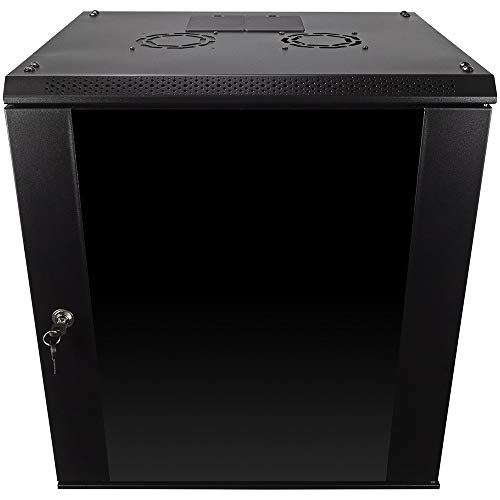
Best for secure access with removable side panels in compact spaces. The 12U NavePoint cabinet uses a tempered glass front with a lock and includes removable side panels for flexible setups. Its 17.72″ x 21.65″ footprint matches many 19″ IT devices and A/V gear. It supports up to 110 lbs, offering a sturdy base for essential equipment. A limitation to consider: assembly may require careful alignment of rails and panels during installation.
VEVOR 22U Wall Mount Cabinet

Best for higher device counts in space-limited environments. The 22U cabinet provides ample rack space, a locking tempered glass door, and four caster options for mobility. It supports up to 300 lbs and is designed for good airflow with ventilation and heat-dissipation holes. Choose this if you anticipate expanding equipment in the near term; avoid this if you lack the mounting depth to accommodate deeper equipment beyond 17.7″ front-to-back dimensions.
VEVOR 9U Wall Mount Cabinet

Best for tight spaces requiring quick access with essential security. The 9U cabinet offers a compact depth of 15.5″ and a locking glass door with side panels. It suits small offices and classrooms needing secure access for IT equipment and A/V devices. A limitation to note is the limited U space for larger configurations, which may require future expansion planning.
NavePoint 12U Cabinet With Fans

Best for cooling-focused installations. This 12U NavePoint cabinet includes fans to enhance airflow, aiding heat management in dense equipment racks. It features a locking glass door and removable side panels for flexible configuration. Choose this when equipment tends to run warm; a caution is that fan-driven airflow should be considered alongside overall room cooling to prevent hotspots.
Buying Guide: Key Considerations For Secure Wall-Mount Racks
- Security features: Prioritize lockable doors and side panels, ideally with tamper-resistant hardware. Consider whether the door can be placed on either side for door-swing flexibility.
- Depth and space: Measure available wall space and equipment depth. Choose a cabinet with a mounting depth that accommodates current gear plus future expansion.
- Rail and mounting options: Look for fully adjustable mounting rails and numbered U positions for precise equipment placement. Check for top/bottom punch-outs for cable routing.
- Airflow and cooling: Favor cabinets with ventilation or cooling holes, and optional fans when heat-sensitive gear is involved. Plan airflow around the room to prevent hotspots.
- Weight rating: Verify the maximum load capacity matches or exceeds the combined weight of your devices, including future additions.
- Door orientation and accessibility: A reversible door or adjustable front panel orientation simplifies installation in varied spaces.
- Build quality: Welded frames and cold-rolled steel construction typically offer better durability for long-term use.
Frequently Asked Questions
- What is a wall-mount server cabinet best for? It is ideal for space-constrained environments like small offices, classrooms, and retail spaces needing secure housing for IT gear.
- How deep should a wall-mount enclosure be? Choose a depth that accommodates your deepest device with room for cabling; common depths range from 14 to 17.7 inches.
- Why are locking doors important? Locking doors prevent unauthorized access and protect sensitive networking equipment from tampering.
- Can I mix equipment sizes inside a single cabinet? Yes, but you should plan rail positioning and cable management to optimize airflow and accessibility.
- Is airflow a concern with wall-mount cabinets? Yes; adequate ventilation prevents overheating for dense IT gear, especially with multiple devices in a small footprint.
- When should I upgrade to a larger cabinet? If you exceed current U capacity or require additional cooling, upgrade to a higher-U model with better airflow.