Choosing a robust RS485 to WiFi converter ensures reliable data transmission between legacy serial devices and modern IP networks. The following selection highlights five proven models that support various networking modes, Modbus gateways, MQTT, and bidirectional data flow. Each entry includes a quick feature snapshot to help you compare capabilities at a glance.
| Product | Brand | Key Features |
|---|---|---|
| Serial to WiFi Ethernet Wireless Converter RS232 RS485 Serial Server | PUSR | Bidirectional transparent transmission, WiFi 2.4GHz 802.11b/g/n, TCP/UDP/HTTP client/server modes |
| PUSR Serial to Dual Band WiFi Converter USR-DR164 | PUSR | Dual band 2.4G/5.8G, Modbus gateway, TCP/RTU conversion, easy configuration via Smart APlnk |
| RS232/485 to WiFi Ethernet Serial Server Converter | waveshare | Integrated serial server, Modbus gateway, MQTT gateway, supports AP/STA/AP+STA, TCP/UDP |
| DSD TECH SH-B35W WiFi to RS485 RS232 DTU | DSD TECH | WiFi to RS485/RS232 with TCP, HTTP Client, MQTT, industrial focus |
| USR-W630 Industrial Serial RS232/RS485 to WiFi and Ethernet Converter | BGNing | Bidirectional transparent transmission, dual RJ45 Ethernet ports, Modbus RTU/TCP, wide power range |
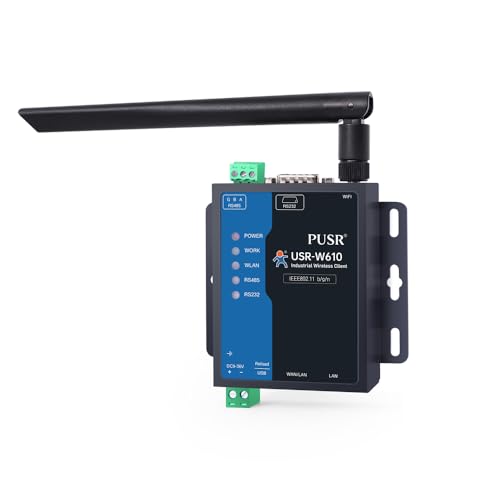
PUSR USR-W610 Serial to WiFi Converter

The USR-W610 functions as a bidirectional transparent bridge between RS232/RS485 serial interfaces and WiFi or Ethernet networks. It supports WiFi 2.4GHz 802.11b/g/n and multiple networking modes, including TCP Server, TCP Client, UDP Server, UDP Client, and HTTP Client. This versatility makes it suitable for factory floor devices, sensor networks, and remote monitoring systems that require reliable, low-latency data transfer. Built to withstand industrial environments, the W610 focuses on stable data routing and straightforward configuration.
PUSR USR-DR164 Dual Band WiFi Converter

The USR-DR164 offers dual-band WiFi (2.4G + 5.8G) in a compact form factor, prioritizing space efficiency. It serves as a Modbus gateway, translating Modbus TCP/RTU communications to the network, and features easy configuration through the Smart APlink app. Ideal for closely spaced control panels or retrofits where a small footprint and straightforward setup are essential for modernizing legacy equipment.
waveshare RS232/485 to WiFi and Ethernet Converter

Waveshare’s RS232/485 to WiFi and Ethernet converter combines several roles into a single device: serial server, Modbus gateway, and MQTT gateway. It supports serial port to WiFi or Ethernet and includes robust networking options such as AP mode, STA mode, and AP+STA. The device is designed for industrial environments and provides flexible networking methods, including various wired and wireless configurations, to fit complex installations and long-term deployments.
DSD TECH SH-B35W WiFi to RS485 RS232 DTU

DSD TECH focuses on USB, serial, and wireless connectivity. The SH-B35W enables WiFi access to RS485/RS232 devices, supporting common protocols such as TCP, HTTP Client, and MQTT. It is suited for integration in environments where wireless connectivity is needed to extend the reach of serial-equipped equipment to IP networks. The device emphasizes compatibility and straightforward pairing with existing serial devices.
USR-W630 Industrial Serial to WiFi and Ethernet Converter

The USR-W630 supports dual RJ45 Ethernet ports and bidirectional transparent transmission between RS232/RS485 and WiFi or Ethernet. It targets industrial applications requiring robust Modbus RTU to TCP conversion and reliable operation under challenging conditions. Its wide voltage input and rugged housing make it suitable for installations in control cabinets, manufacturing lines, and remote monitoring points where dependable data flow is critical.
PUSR Serial RS485 RS232 to WiFi Converter Industrial Gateway
Featuring a Qualcomm chipset and support for Modbus RTU/TCP, this PUSR model provides reliable gateway functionality for industrial settings. It enables poll-based and multi-host configurations with transparent MQTT, TCP, UDP, and HTTP data communications. The device is designed for continuous operation in harsh environments and supports multiple host configurations for modbus networks and remote telemetry tasks.
Buying Guide: Key Considerations For Choosing An RS485 To WiFi Converter
When selecting an RS485 to WiFi converter, consider these critical factors to ensure compatibility, reliability, and future-proofing:
- Networking modes: Look for TCP/UDP, AP/STA operation, and HTTP client support to fit your network topology and firewall rules.
- Modbus support: If you use Modbus RTU/TCP, confirm gateway compatibility and polling capabilities for seamless industrial integration.
- Bidirectional transparency: Ensure the device supports true bidirectional transparent transmission to preserve data integrity and timing.
- Power and environmental ratings: Check voltage ranges (some models offer wide input 5-36V) and enclosure ruggedness for harsh environments.
- Wireless options: Dual-band WiFi or single-band with robust security features may be essential for crowded RF spaces or outdoor deployments.
- Configuration and management: App-based setup (APLink, Smart APlink, etc.) or Web UI should be straightforward and support firmware updates.
- Device compatibility: Confirm compatibility with your existing serial devices (RS232, RS485) and target network protocols (MQTT, HTTP, Modbus).
- Reliability features: EFT protection, surge resilience, and built-in watchdog or restart functions help sustain uptime in critical environments.
- Physical footprint: In tight installations, consider compact units or those designed for panel mounting with screw terminals.
Additional Perspectives: How To Choose By Use Case
If you’re retrofitting an old control system, prioritize Modbus gateway capabilities and a straightforward configuration flow. For remote monitoring across multiple sites, devices with dual-band WiFi or Ethernet redundancy provide greater resilience. In factory settings where space is limited, compact gateways with easy-to-deploy AP/STA networking options can simplify deployment. Finally, for edge computing tasks requiring MQTT and HTTP support, ensure the gateway’s firmware supports these protocols robustly and provides reliable security configurations. Across all scenarios, select devices with clear documentation and long-term firmware support to sustain performance as your network evolves.
Notes On Deployment And Maintenance
Plan network placement to minimize interference and maximize signal strength. Maintain a consistent firmware update schedule to mitigate security vulnerabilities and improve compatibility with IP networks. When configuring Modbus gateways, document your register mappings and polling rates to avoid data gaps. Test bidirectional paths in a controlled environment before full-scale deployment to confirm that serial data is transmitted accurately and reliably across the WiFi or Ethernet links.