Looking for a sleek, space-saving power solution that keeps work areas tidy? A pop up tower socket can provide accessible outlets while staying hidden when not in use. This guide highlights five top options ideal for kitchens, conferences, desks, and islands. Each product is evaluated for who it suits best, what it offers, and a practical caveat to consider.
| Product | Best For | Key Benefit | Note |
|---|---|---|---|
| Pop Up Electrical Outlet for Countertop — 3 AC, 2 USB | Kitchens & conference desks | Retractable 5-in-1 hub | 1875W max; 16AWG cord |
| Automatic Pop Up Outlet — 4 AC, 2 USB A, 2 USB C | Multidevice workstations | Four outlets plus USB-C/USB-A mix | Top-access install; non-waterproof interior |
| Pop Up Outlet for Countertop — 3 AC, 2 USB | Modern countertops | Hidden, flush design | UL listed; PD 20W USB-C |
| Pop Up Outlet With 2 USB & 20W PD | Compact workspaces | 3 USB ports total with PD | 85mm hole size |
| Pop-Up Power Tower — 4 AC, USB-C, USB-A, Wireless | Office islands & desks | Wireless charging top pad | Splash-resistant; pneumatic lift |
Best Pop Up Electrical Outlet for Countertop (3 AC, 2 USB)
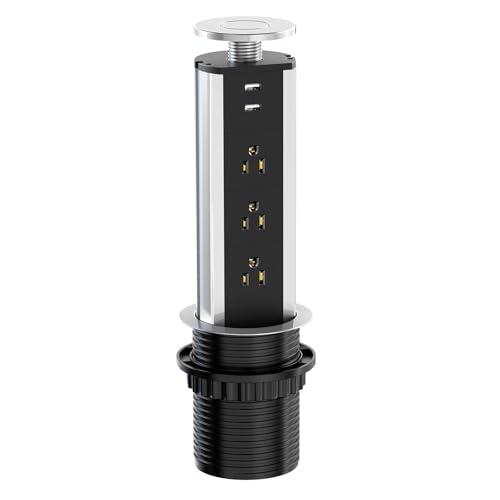
Best for: kitchens and conference tables where clutter-free surfaces matter. This unit offers three AC outlets and two USB ports in a retractable design, making it ideal for keeping small appliances or devices off the counter when not in use. The heavy-duty 1875W capability supports common kitchen devices, and the 16 AWG copper cord helps maintain stable current. Caution: ensure adequate clearance for the pull-up mechanism to avoid obstruction on busy counters.
Automatic Pop Up Outlet for Countertop (4 AC, 2 USB A/C)

Best for: multi-device workstations and modern offices. This configuration provides four US outlets plus both USB-A and USB-C ports, enabling simultaneous charging for laptops, phones, and accessories. It’s designed for quartz or granite countertops and is easy to install by cutting a 4.7″ hole. Limitation: the interior is not waterproof, so keep it away from water spray in kitchens or humid areas.
Kungfuking Pop Up Outlet for Countertop with USB

Best for: clean, minimalist kitchen counters and desks. This model combines three AC outlets with two USB ports and includes a PD-compatible USB-C option. The retractable design keeps surfaces uncluttered, while the metal/ABS build adds durability. Caution: verify hole size around 85 mm to ensure snug fit in your counter cutout.
Pop Up Outlet for Countertop With USB Ports

Best for: desks and conference tables needing a compact, flush mount with USB efficiency. It offers three AC outlets and two USB ports (5V/2.4A) with a hidden mechanism that pops up when needed. The aluminum body and flame-resistant materials provide a sturdy, long-lasting unit. Limitation: ensure the hole cutout is close to the 2.5″ depth to avoid mounting issues.
Pop Up Power Tower With Wireless Charging

Best for: busy kitchens, offices, and conference bays where wireless charging adds convenience. This tower includes four AC outlets, multiple USB ports, and a top wireless charging pad (up to 20W). It uses a pneumatic lift for smooth operation and offers splash resistance for resilience in mixed environments. Caution: consider spill risk near the counter; while splash-resistant, it is not fully waterproof.
Buying Guide
What to consider when choosing a pop up tower socket:
- Power needs: Determine the number of outlets and USB ports you require. If you frequently charge multiple devices, a model with USB-C and USB-A is advantageous.
- Surface compatibility: Check hole size and mounting depth. Models vary from 85 mm to larger footprints; ensure fit with your furniture or countertop.
- Installation: Some units require precise cutouts and top-screw mounting. Consider whether you want a simple drop-in or a more involved install.
- Safety: Look for UL or ETL listings and flame-retardant housing. If the area is prone to splashes or spills, prefer splash-resistant or water-protected designs.
- Best-use scenarios: For kitchens, prioritize models with robust power handles and heat tolerance. For conference desks or islands, a slimmer profile and quiet operation help maintain a clean aesthetic.
FAQ
- Q: Can these outlets be installed in any countertop material? A: Most are designed for wood, granite, quartz, and similar surfaces; verify cutout dimensions and mounting method for your material.
- Q: Are these outlets surge-protected? A: Some models include surge protection; check the product features for exact protection specs.
- Q: Do they require professional installation? A: Many are DIY-friendly with standard hole cuts, but complex installations may benefit from a professional if you’re unsure about wiring and mounting.
- Q: Can the top wireless charging pad operate while the unit is retracted? A: In most designs, wireless charging is available when the unit is raised; refer to the individual product features for specifics.
- Q: Are these outlets waterproof or splash-resistant? A: Some models are splash-resistant, but most interiors are not waterproof; avoid direct water exposure.
- Q: What is the typical power rating for these units? A: Most support up to 125V/15A (1875W) or similar, suitable for common office and kitchen devices.