Need instant, professional ID badges without outsourcing? This guide highlights five top plastic ID card printers designed for on-demand badge creation. The best choices suit small offices, schools, events, and security-focused environments that want fast, reliable card production with ready-made templates and simple software. The following selections balance ease of use, print quality, and the ability to customize designs. Readers can compare features, materials, and ideal use cases to pick the right model for their needs.
| Product | Best For | |
|---|---|---|
| Badgy100 Color Plastic Card Printer | Beginners and small offices | Near-edge color printing with fast turnaround |
| Bodno Seaory S25 | Low-volume, affordable setups | All-inclusive package with easy manual feed |
| Bodno Magicard 400X | Dual-sided projects with vibrant designs | Includes complete supplies and high color capability |
| Badgy100 with Badge Studio | Rapid on-demand badges with templates | Tamper-proof badges in seconds via design software |
| IDP SMART-21S Kit | Windows-based workflows with broad software support | High-resolution color printing with fast throughput |
Badgy100 Plastic Card Printer with Badge Studio

The Badgy100 is designed for on-demand color badge printing with a focus on quick results. It emphasizes high-resolution card output on plastic cards and provides online template access for professional designs. This model is best for individuals or small teams requiring fast, custom badges without outsourcing. A potential limitation is that it is optimized for single-print runs rather than high-volume production.
Who it’s best for: Small offices, schools, event organizers, and teams needing occasional, visually polished badges.
Why chosen: It pairs easy-to-use software with ready-made templates, enabling quick badge creation and replacement of lost or stolen cards on demand.
One caution: For large batches, consider a higher-volume device to reduce per-card cost and throughput.
Bodno Seaory S25 Single Sided Printer Kit

The Bodno Seaory S25 offers an all-inclusive setup with a Seaory color ribbon and 100 prints. It uses a manual feed system, letting you print one card at a time with precise control. The Bronze Edition includes user-friendly software with pre-made templates for easy design. This is a good pick for low-volume environments that value simplicity and a complete starter package.
Who it’s best for: Small teams or individuals who want a ready-to-use kit with straightforward operation and template design tools.
Why chosen: The all-in-one package reduces setup friction and provides a predictable workflow for occasional badge printing.
One caution: Manual feeding may slow throughput if demand increases beyond occasional use.
Bodno Magicard 400X Dual Sided Printer Kit

The Bodno Magicard 400X Dual Sided Printer Kit provides dual-sided printing for more complex badge designs. It includes a 300-print YMCKO color ribbon, delivering vibrant color and full-card coverage. This option suits organizations needing both front and back design space and reliable color reproduction. A potential limitation is the need for compatible software to exploit advanced features fully.
Who it’s best for: Organizations requiring comprehensive card designs with back-side information and higher visual impact.
Why chosen: The dual-sided capability plus a ready ribbon makes it a strong all-around choice for professional badges.
One caution: Ensure your design software supports dual-sided layouts to maximize value.
Badgy100 Color Plastic Card Printer
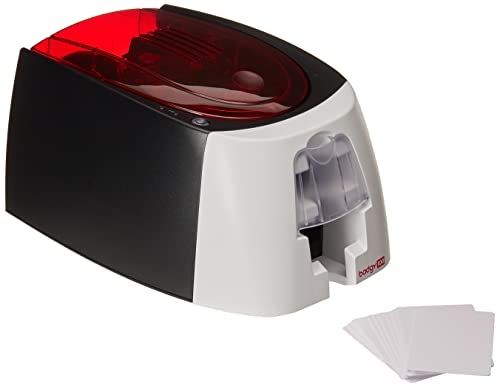
This Badgy model focuses on color badge printing with near-edge capability. It emphasizes fast color output and user-friendly setup, making it suitable for beginners and users who want quick color badges. The included Mac-compatible ID design software is a plus for mixed-platform environments. However, high-volume runs may benefit from a more robust machine.
Who it’s best for: Beginners and Mac-friendly environments needing easy color badge creation.
Why chosen: It balances fast color production with accessible design tools and simple operation.
One caution: Not ideal for large-scale print jobs due to potential throughput limits.
IDP SMART-21S ID Card Kit

The IDP SMART-21S Starter Kit delivers a Windows-ready workflow with IDesigner software and a printer capable of high-resolution color output. The package includes 100 print YMCKO ribbons and 100 PVC cards, facilitating quick start for color ID projects. This option suits offices already standardized on Windows and needing robust software support.
Who it’s best for: Windows-based users and teams seeking strong software integration for color cards.
Why chosen: The kit’s complete software and driver setup helps streamline badge creation and deployment.
One caution: Performance depends on compatible hardware and drivers on Windows 10 or 11 systems.
Buying Guide
What to consider when choosing a plastic ID card printer:
- Print volume: Choose from single-sided or dual-sided printers based on expected badge output.
- Color capability: Decide between color-dominant printing or monochrome with occasional color cards.
- Software ease-of-use: Templates and drag-and-drop design tools speed badge creation.
- Compatibility: Ensure OS support (Windows, Mac, Linux) and driver availability.
- Supplies included: All-inclusive kits save time and reduce setup steps.
- Template library: Ready-made designs help achieve professional looks quickly.
Frequently Asked Questions
- What is a dual-sided ID card printer best used for?
– It supports more information on a single card, such as front photo and back access details. - Are starter kits worth it for a new user?
– Yes, they provide essential ribbons, cards, and software to begin printing right away. - Can these printers work with Mac computers?
– Some models offer Mac-compatible software and drivers; check each product’s software details. - Is color printing necessary for all ID badges?
– Not always; monochrome can suffice for simple badges, but color enhances visibility and branding. - What should I consider for data security on badges?
– Look for tamper-evident features, secure templates, and reliable card materials to deter fraud.
Choosing the right plastic ID card printer involves balancing print needs, software support, and budget. The selections above provide a range of entry-level to more capable options, each with distinct strengths for different buyer profiles.