Searching for a Google-compatible door lock? This guide highlights top smart locks that work with Google Assistant, offering secure keyless entry, remote access, and voice control. Ideal buyers include busy homeowners, tech enthusiasts, and renters who want convenient, remote entry management. The table below compares five strong options, focusing on Google compatibility, unlocking methods, and key limitations to help you decide quickly.
Overview Table of Selected Products
- Product: Philips Wi‑Fi Door Lock — Google Assistant compatible; built-in Wi‑Fi; app control.
- Product: Google Nest x Yale Lock — native Google integration; keypad entry; remote unlock via Google ecosystem.
- Product: eufy Security Smart Lock C220 — built-in Wi‑Fi; broad unlocking methods; reliable power.
- Product: Philips WiFi Keypad Door Lock — direct Wi‑Fi; voice control with Google; keypad entry.
- Product: Veise VE012W — built-in Wi‑Fi; 6-in-1 access; strong fingerprint and PIN options.
Philips Wi-Fi Door Lock, Keyless Entry

This lock offers flexible unlock methods: app, passcode, fingerprint, physical key, or voice via Alexa/Google Assistant. Best for multi-user households seeking flexible access options. Note that batteries are not included, so plan for a power source and frequent use scenarios.
Why it’s Google-friendly: Voice control via Google Assistant allows hands-free locking or unlocking, which is convenient when your hands are full. Remote control is supported through built-in Wi‑Fi, so you can monitor and operate your door from anywhere without a hub.
Limitations to consider: Requires a stable 2.4 GHz Wi‑Fi network and a router within about 65 feet of the lock for optimum performance. Some users may prefer a lower-latency hub-free option at shorter range.
Who should buy this: Families wanting multiple unlock methods and easy Google Assistant voice control, without adding a separate hub or bridge. Better for homes with reliable Wi‑Fi coverage and a 2.4 GHz network.
Google Nest x Yale Lock

Best for: homeowners already invested in Google ecosystems who want seamless integration with Google Home for routine access control. This lock replaces your existing deadbolt with a keypad entry option and offers remote unlocking via the Google ecosystem.
Why selected: It emphasizes keyless entry with an LED keypad and supports guest access through the Google Home app, enabling easy entry for visitors without sharing physical keys. The product is designed to be compatible with Google’s smart home behaviors and scenes.
Limitations to note: Backset, cross bore, and door thickness must be matched to the lock for proper fit. It relies on a compatible Google setup and a Matter-enabled hub for some remote features, depending on your configuration.
Who should buy this: Users prioritizing Google-based automation and keypad entry, who want a clean, keyless front door aesthetic. Choose this if your door dimensions align with its fit profile and you already use Google for routines.
eufy Security Smart Lock C220

Best for: users seeking robust Wi‑Fi-enabled control with long battery life and self-learning fingerprint technology. The C220 supports multiple unlock methods, including fingerprint, keypad, app control, and voice control via Alexa/Google.
Why it stands out: Built-in Wi‑Fi removes the need for a bridge, enabling remote access from anywhere via the eufy Security app. The lock is designed to be power-efficient, with an 8-month typical battery life, and offers real-time notifications and event history.
One caveat: While self-learning AI improves fingerprint accuracy, performance may vary with extreme temperatures or very low light conditions on some days.
Who should buy this: Tech-savvy households wanting hands-free voice control alongside strong biometric access and independent Wi‑Fi connectivity. Opt for this if you value remote control without a separate hub and reliable notifications.
Veise VE012W Built-in WiFi Fingerprint Lock

Best for: households needing diverse access methods, including 20 stored fingerprints, unlimited one-time codes, PINs, physical keys, and voice commands, all controllable via app.
Why chosen: The 6-in-1 keyless entry design provides redundancy in case one method is unavailable. Built-in 2.4 GHz Wi‑Fi enables remote operation without a hub, and the AI-based fingerprint recognition claims rapid unlock in under 0.2 seconds.
Limitations to consider: The advanced features rely on consistent app connectivity and stable Wi‑Fi. Users should ensure sufficient Wi‑Fi coverage around the entryway for best performance.
Who should buy this: Families needing flexible, multi-method access for multiple users and guests, with a preference for quick biometric entry and voice options. Choose this if you value extensive access options in one device.
Philips Built-in WiFi Smart Lock with Touchscreen
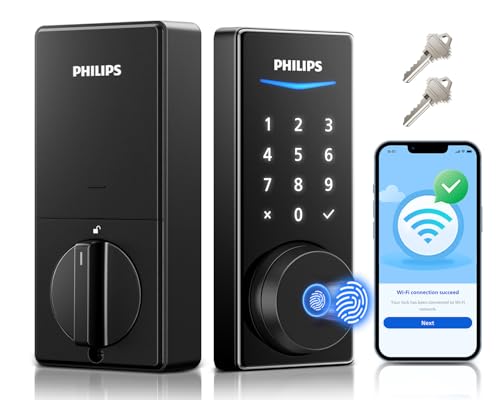
Best for: users who prefer a touchscreen keypad alongside biometric and voice unlock features. This Philips model includes a built-in Wi‑Fi module for remote management without an extra hub.
Why it’s a fit: It combines 360° fingerprint recognition with touchscreen entry and voice control via Alexa/Google Assistant. The lock supports real-time notifications and user management through the Philips Home Access app.
Limitation to note: The touch-based interface may require occasional calibration for accuracy in bright or dusty environments. Battery use and maintenance should be planned for due to frequent touches.
Who should buy this: Households seeking a modern, touchscreen experience with reliable Google compatibility and robust voice control. Best if you want biometric access plus a tactile keypad for guests without a smartphone.
Buying Guide
What matters most when choosing a Google-compatible door lock? Consider these practical questions and factors to compare options effectively.
- What unlock methods are essential for you? Look for a mix of fingerprint, keypad, app, physical key, and voice control.
- Do you already use Google Assistant or Google Home routines? Ensure the lock integrates smoothly with Google to enable voice or routine-based access.
- Is built-in Wi‑Fi important, or would you accept a hub-based system? Built-in Wi‑Fi enables remote access without extra devices, but some ecosystems rely on hubs for full feature sets.
- What is your door’s fit and backset? Check the product’s compatibility with your door dimensions to avoid installation issues.
- What is the power plan? Battery life varies; longer life means less maintenance, but battery availability should be planned for.
- What about guest access? If you frequently grant access to visitors or service providers, consider codes, temporary codes, and remote sharing capabilities.
Key Comparisons
- Best for Google-native experience: Google Nest x Yale Lock, due to deep Google ecosystem integration.
- Best for hub-free remote access: eufy Security Smart Lock C220 or Philips models with built-in Wi‑Fi.
- Best for biometric-first access: Veise VE012W and Philips with 360° fingerprint recognition.
- Best for keypad lovers: Philips WiFi Keypad Door Lock and Nest Yale with LED keypad.
FAQ
- Do these locks work with Google Assistant on iOS and Android? Yes, most support Google Assistant on both platforms via the Google Home app.
- Is a separate hub required for Google compatibility? Many models offer built-in Wi‑Fi to avoid a hub, while some require a Matter-enabled hub for remote access.
- Can I grant temporary access to guests? Several models support one-time or temporary codes via the app, making it easy to manage guests.
- How secure are these locks? They combine biometric authentication, PINs, and encrypted app connections, but security also depends on network hygiene and firmware updates.
- What maintenance is needed? Regular battery checks or replacements and ensuring firmware/app updates keep features active.
- Which model is best for apartments? A compact, keypad-selectable model with reliable app control and Google integration is often ideal for limited space and rentals.