Introduction
If your PC’s power button is hard to reach, an external power switch can turn accessibility into a simple reach. These external buttons are designed to work with standard ATX motherboard pins and can extend control to desks, racks, or floor placements. They’re ideal for home offices, server rooms, or DIY builds where the case is tucked away. The top picks below cater to different needs—long cable length, easy adhesive mounting, RGB lighting, or dual-switch setups. The quick reference table helps compare core specs at a glance.
| Product | Cable Length | Best For | |
|---|---|---|---|
| LHKLUK External Power Switch (118″ Cable) | 118 inches | Hard-to-reach cases, DIY enthusiasts | Adhesive mounting included |
| DKE Desktop PC Power Switch (2 m) | 2 meters | Rooms with far USB/space access | Simple installation |
| OwlTree External Power Switch | Standard length (ext) not specified | Quick replacement for damaged buttons | Acrylic, compact |
| OwlTree External Power Button (Split SW) | Not specified | Relocating power and reset lines | Includes LED and HDD LED support |
| XMSJSIY RGB External Power Switch (2 m) | 2 meters | Dual-switch setups with RGB toggle | RGB light feature |
PC Power Button with 118″ Cable — LHKLUK

This external desktop power switch is designed for people who need convenient access from a desk, rack, or floor. It uses a standard 4-pin connector compatible with most ATX motherboards and includes a long 118-inch extension cable. It is best for home users with hard-to-reach cases and DIY projects needing a reliable fix for a damaged front panel button. A caution: check your motherboard header labeling to match POWER SW and LED pins before installation.
Who it’s best for and why selected
- Best for: DIY enthusiasts and users who want substantial reach to a distant PC case.
- Why selected: The long cable and adhesive mounting provide flexible placement without drilling.
DKE Desktop PC Power Switch — 2 M Cable
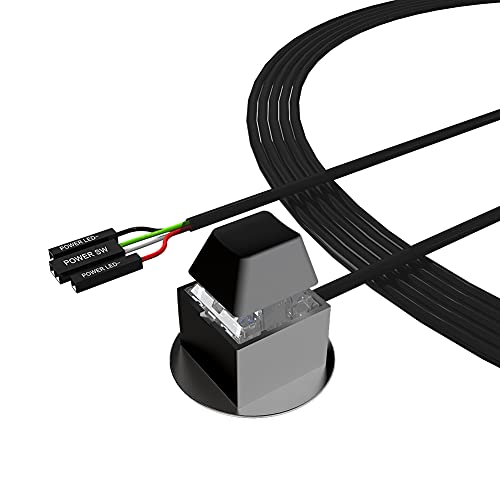
This external power switch caters to users who want a straightforward, plug-and-play extension with a two-meter cable. It’s designed to simplify turning a PC on or off from a convenient location without modifying the chassis. The installer guide emphasizes connecting POWER SW and +HDD- to the motherboard, then using adhesive mounting. Limitation: some setups may require routing cables around tight spaces or through existing openings to reach headers.
Who it’s best for and why selected
- Best for: Users who prioritize simple installation and a clear wiring path.
- Why selected: Minimal setup steps reduce the risk of miswiring during upgrades.
OwlTree PC Power Button — External On/Off Switch

This OwlTree option emphasizes easy installation via sticker mounting and is aimed at users needing a quick replacement for a damaged chassis button. It supports routing the wiring through front optical bay positions, rear vents, or expansion slots. Best for: quick repairs and non-destructive relocation. Caution: ensure adhesive strong enough for your surface and that the switch aligns with the motherboard headers.
Who it’s best for and why selected
- Best for: Replacing a damaged internal button without chassis modification.
- Why selected: The adhesive-based mount reduces the need for tools and drilling.
OwlTree External Switch — Splitter and LED Support

This external power button includes a splitter for a dual-function setup, letting you manage POWER SW, RESET SW, POWER LED, and HDD LED lines. Ideal for those who want to relocate both power and reset controls and still monitor drive activity. It’s best for labs or custom builds where multiple front-panel signals need to be accessible. Limitation: ensure your motherboard supports dual-switch wiring and LED indicators as described in the installation guide.
XMSJSIY RGB External Power Switch — 2 M Cable

This RGB-enabled external PC power switch adds a visual cue to power state with a two-meter cable. It supports a dual-switch design by using included splitter adapters to link with the motherboard’s POWER LED and POWER SW pins, plus a reset function. Best for gaming setups or aesthetic-conscious builds that benefit from illuminated feedback. Caution: RGB lighting requires power delivery from the motherboard or power source; confirm compatibility with your system’s headers.
Buying Guide: How to Choose the Right External PC Power Switch
What length do you need?
Choose cable length based on your case placement. Longer cables offer flexibility for desks, racks, or floor setups, while shorter cables reduce clutter near the motherboard.
Which mounting method works for you?
Adhesive mounting is quick and non-destructive, suitable for smooth surfaces. If you prefer a more secure hold or plan to relocate often, consider a model that uses mounting screws or a provided bracket.
What features matter most?
- LED indicators help confirm power status and wiring correctness.
- Reset switch functionality is useful for dual-control setups.
- RGB lighting adds aesthetics but may draw extra power from the motherboard.
Compatibility and installation
Ensure the external switch uses a standard 4-pin POWER SW/LED header pairing for ATX motherboards. Follow the manufacturer’s wiring labels (POWER SW to SW_PW, LED to PLED) and verify there’s no conflict with existing front-panel cables.
Replacement vs upgrade scenarios
Use external switches to replace a faulty chassis button, relocate controls for accessibility, or enable new panel configurations in DIY builds. Consider whether you need a single-function on/off or a dual-switch setup with reset and LED indicators.
FAQ
- Will these work with any ATX motherboard? Most use standard POWER SW and LED headers; compatibility depends on header labeling and available space for routing cables.
- Do these require drilling or chassis modifications? In most cases, no. Adhesive mounting or front-panel openings are used, preserving the original case.
- Can I use RGB models with non-RGB motherboards? Yes, the RGB feature is independent, but ensure there is a power source and header support if you want lighting to work.
- What if my case is in a tight spot? A long cable or splitter option helps reach a convenient location without reshaping the case interior.
- Is a dual-switch setup better for accessibility? A dual-switch design can provide power and reset functions from a single accessible location, improving workflow.
- Are these safe to use for frequent power cycling? They are designed for common on/off operations, but avoid excessive power cycling that could stress connectors over time.