Choosing the right data center cable trays helps improve airflow, reduce cabling clutter, and simplify future reconfigurations. This article highlights five top-rated wire mesh and metal cable management trays designed for data centers, server rooms, and network closets. Each product is evaluated based on construction, span length, load capacity, and ease of installation. Use the buying guide at the end to compare materials, mounting options, and compatibility with existing rack systems.
| Product | Type | Span / Size | Key Benefit |
|---|---|---|---|
| TRIPP LITE SRWB6410STR10 | Wire Mesh Tray | 6″ W x 4″ H x 10 ft | High strength steel, easy cutting to fit |
| TRIPP LITE SRWB12210STR10 | Wire Mesh Tray | 12″ W x 2″ H x 10 ft | Wide channel for dense cable layouts |
| StarTech CABSHF2POST2 | Rack Shelf | 20″ Deep | Center-mount shelf for quick rack deployment |
| Yecaye Cable Raceway (62.8in) | Under-Desk Raceway | 62.8″ length | Flexible, adhesive-backed, large capacity |
| Litwaro Under Desk Tray | Cable Management Tray | 2-Hole, No Drill | Clamp mounting, desk-friendly |
TRIPP LITE Wire Mesh Tray 6×4 In Data Center Use

These 6″ by 4″ wire mesh trays are designed to eliminate cable stress in data centers and industrial environments. The 10-foot straight sections can be cut with bolt cutters to fit a specific layout, allowing installation along walls, floors, or ceilings. The black powder-coated steel provides a smooth surface with large mesh openings for flexible routing. The kit includes 10 spans, enabling efficient multi-location coverage while maintaining a neat appearance. Ideal for equipment racks, wall runs, and mezzanine installations where cable density is high.
TRIPP LITE Wire Mesh Tray 12×2 In For Tight Bundles

This 12″ wide by 2″ high mesh tray provides a broader channel for dense cable installations typical in data centers and large-scale IT rooms. Like the smaller option, it ships in a 10-foot straight section that can be trimmed to fit a tailored path. The heavy-duty, powder-coated steel construction resists wear and corrosion, and the tray’s openings facilitate airflow and cable routing. Multipack configuration is convenient for expanding existing networks without multiple orders.
StarTech Center-M Mount Shelf For Racks

This universal 2U, 19″ center-mount rack shelf supports heavy equipment up to 75 lb, making it suitable for AV and data center gear. The cantilever design provides easy access to cables and devices, with included cage nuts and screws for quick mounting. While not a wire tray, this shelf complements open rack spaces by organizing equipment and routing cables efficiently within a 2-post or 4-post rack configuration. A solid choice for adding a modular layer of storage above or below equipment.
Yecaye 62.8-inch Cable Raceway
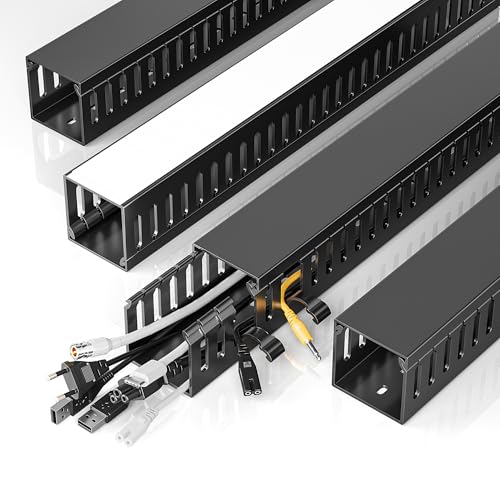
This large under-desk raceway is designed to centralize and hide a broad array of cables, including Ethernet, power, HDMI, and USB lines. Its flexible opening design accommodates varying cable thicknesses, and a strong adhesive back enables tool-free mounting on walls or cabinets. The fully enclosed structure helps deter pet interference and provides a neat, low-profile solution that can be trimmed to fit longer runs. It is well-suited for server desks and data center workstations where quick reconfiguration may be needed.
Litwaro Under Desk Cable Management Tray

A no-drill, clamp-mounted under-desk tray, this Litwaro model offers a quick install for data centers and office environments. It includes two side holes for cable pass-through and has a load rating around 15 lbs when installed correctly. Rubber pads protect desk surfaces during mounting, reducing the risk of scratches. Its compact design makes it suitable for smaller server rooms or workstations where space is at a premium.
Buying Guide
- Material and finish: Look for powder-coated steel or high-strength PVC raceways. Powder coatings resist corrosion in data centers with environmental variability.
- Span length and modularity: Longer spans reduce the number of joints but may require cutting to fit. Multipacks simplify extending trays across larger layouts.
- Load capacity: Consider equipment weight and cable density. Heavier trays are common in data centers and server rooms, where durable support prevents sag.
- Mounting options: Wall, floor, ceiling, or under-desk mounting options provide flexibility. Clamp mounts and no-drill designs save time in retrofit projects.
- Airflow and heat management: Open mesh trays improve airflow around cables, which helps with heat dissipation and cooling efficiency in dense racks.
- System compatibility: Ensure the tray type integrates with your racks (2-post, 4-post, or wall-mount) and with existing cable management accessories.
- Installation ease: Cut-to-fit trays, pre-drilled mounting holes, and included hardware reduce installation time and labor costs.
- Organization strategy: Use a combination of trays, shelves, and raceways to separate power and data paths, minimize cross-talk, and simplify future upgrades.
- Maintenance: Choose trays with straightforward access for re-cabling and modular components that allow quick swaps without disturbing adjacent hardware.
- Longevity and warranty: Opt for brands offering multi-year warranties and service support to protect long-term investments in critical infrastructure.